

Fine-Tuning Models with LoRA
Feature Description
LoRA refers to Low-Rank Adaptation, a method for fine-tuning pre-trained models. LoRA can adapt to new tasks by introducing low-rank matrices without altering the weights of the pre-trained model. In text-to-image and image editing tasks, LoRA can be used to fine-tune pre-trained image models, enabling them to perform better on specific tasks.
Models Supporting LoRA
- Flux.1-dev
- Flux.1-schnell
- Flux.1-Kontext-dev
- InstantCharacter
- OmniConsistency
- stable-diffusion-xl-base-1.0
Experience the API Effect
Function Description
The Serverless API provides an interface for quick experience, allowing you to quickly test the API 效果。
Open the Serverless API page, find the Flux.1-dev model under Image Generation and Processing, and click to enter the interface details page.
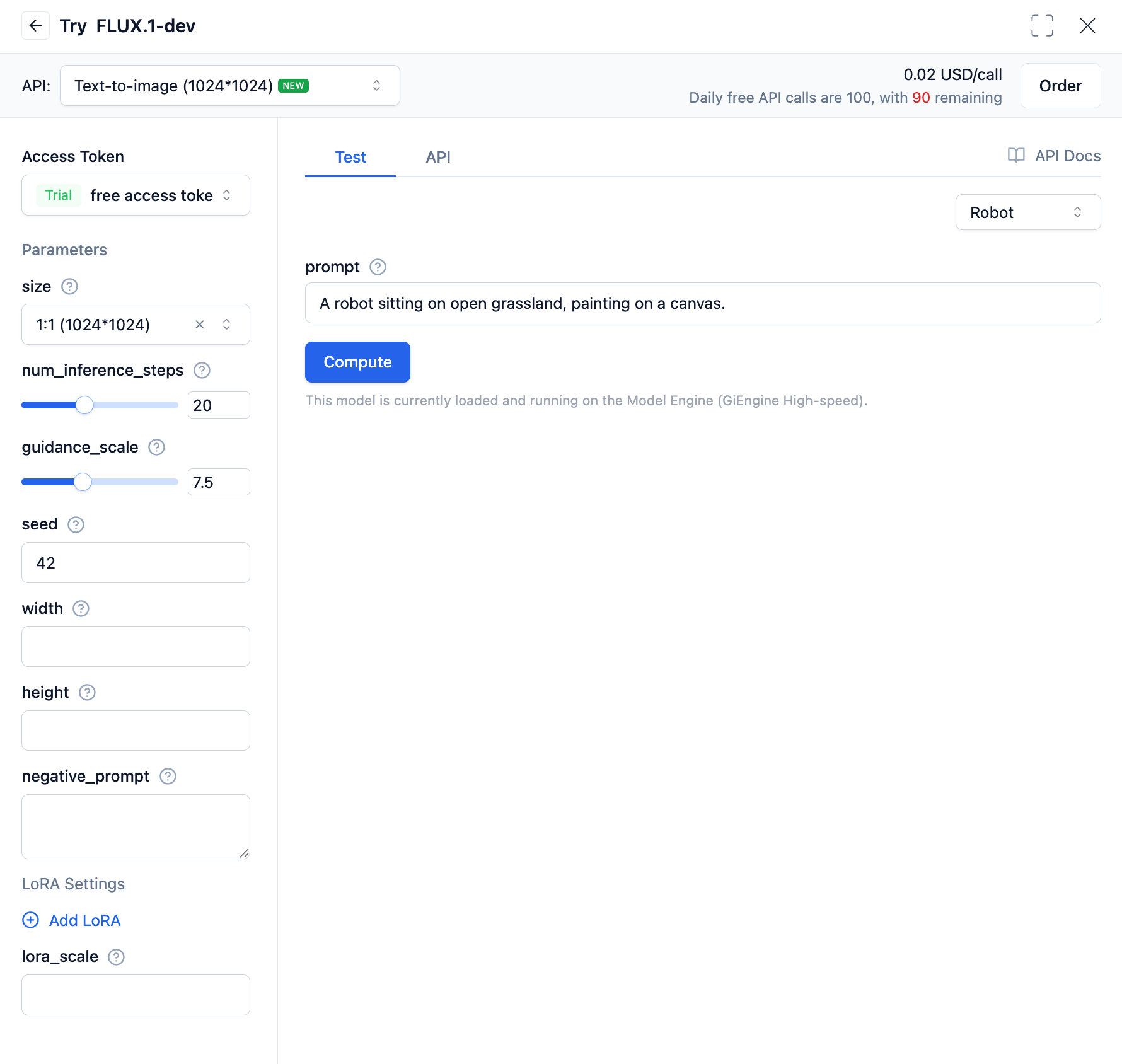
In the text-to-image API, within the LoRA settings: url is the URL of the LoRA model to be loaded; weight is used for weighted fusion between different LoRA model weights; lora_scale is the degree of influence the LoRA model has on the base model.
Calling the Text-to-Image Model
Using OpenAI SDK
The following explains how to use the Flux.1-dev text-to-image LoRA interface through the OpenAI SDK. Here's a Python example:
from openai import OpenAI
import base64
import requests

client = OpenAI(
    base_url="https://api.moark.ai/v1",
    api_key="XXXXXXXXXXXXXXXXXXXXXXXXXXXXXXXXXXXXXXXX",  # Replace with your API Key
)

response = client.images.generate(
    prompt="A robot sitting on open grassland, painting on a canvas.",
    model="FLUX.1-dev",
    size="1024x1024",
    extra_body={
        "num_inference_steps": 20,
        "guidance_scale": 7.5,
        "seed": 42,
        "lora_weights": [
            {
                "url": "https://example.com/lora-model.safetensors",  # Replace with your LoRA model URL
                "weight": 1,
            }
        ],
        "lora_scale": 0.5
    },
)

for i, image_data in enumerate(response.data):
    if image_data.url:
        # Download from URL
        ext = image_data.url.split('.')[-1].split('?')[0] or "jpg"
        filename = f"FLUX.1-dev-output-{i}.{ext}"
        response = requests.get(image_data.url, timeout=30)
        response.raise_for_status()
        with open(filename, "wb") as f:
            f.write(response.content)
        print(f"Downloaded image to {filename}")
    elif image_data.b64_json:
        # Decode base64
        image_bytes = base64.b64decode(image_data.b64_json)
        filename = f"FLUX.1-dev-output-{i}.jpg"
        with open(filename, "wb") as f:
            f.write(image_bytes)
        print(f"Saved image to {filename}")
Using Requests Library
If you prefer not to use the OpenAI SDK, you can directly use the requests library to call the text-to-image model. Here's a Python example:
import requests
import base64
import json

url = "https://api.moark.ai/v1/images/generations"

headers = {
    "Authorization": "Bearer XXXXXXXXXXXXXXXXXXXXXXXXXXXXXXXXXXXXXXXX",  # Replace with your access token
    "Content-Type": "application/json",
    "X-Failover-Enabled": "true"
}

data = {
    "prompt": "a white siamese cat",  # Replace with your text description
    "model": "FLUX.1-dev",  # Replace with your selected model name
    "size": "1024x1024",
    "seed": 42,
    "response_format": "b64_json",
    "num_inference_steps": 25,
    "guidance_scale": 7.5,
    "lora_weights": [
        {
            "url": "https://example.com/lora-model.safetensors",  # Replace with your LoRA model URL
            "weight": 1,
        }
    ],
    "lora_scale": 0.5
}

response = requests.post(url, headers=headers, json=data)

if response.status_code == 200:
    for i, image_data in enumerate(response.data):
        if image_data.url:
            # Download from URL
            ext = image_data.url.split('.')[-1].split('?')[0] or "jpg"
            filename = f"FLUX.1-dev-output-{i}.{ext}"
            response = requests.get(image_data.url, timeout=30)
            response.raise_for_status()
            with open(filename, "wb") as f:
                f.write(response.content)
            print(f"Downloaded image to {filename}")
        elif image_data.b64_json:
            # Decode base64
            image_bytes = base64.b64decode(image_data.b64_json)
            filename = f"FLUX.1-dev-output-{i}.jpg"
            with open(filename, "wb") as f:
                f.write(image_bytes)
            print(f"Saved image to {filename}")
else:
    print(f"Request failed, status code: {response.status_code}")
    print(f"Error message: {response.text}")
For other programming languages, you can refer to the sample codes in the API documentation.
 京公网安备11011502039387号