

Document Parsing
Basic Introduction
Document parsing refers to the technology of extracting valuable information and content from various formats of documents through artificial intelligence models. Its core task is to convert unstructured or semi-structured document content into structured data, facilitating subsequent analysis and processing. Document parsing technology is widely applied in fields such as knowledge base construction, data mining, and information retrieval.
Currently, the document parsing models available on Model Plaza include: PDF-Extract-Kit
PDF-Extract-Kit
PDF-Extract-Kit is specifically designed to efficiently extract high-quality content from various complex PDF documents. It features the following:
- Accurately restores the layout of the original document.
- Outputs content in Markdown format for easy reading.
- Segments output content by page and semantic logic.
- Recognizes mathematical formulas.
- Recognizes tables.
- Supports multilingual recognition.
Applicable scenarios:
- Knowledge bases and datasets: Directly used in AI scenarios such as RAG, fine-tuning, and machine learning.
- Enterprise document digitization: Extracts information from traditional paper document images or scanned documents to enhance enterprise management digitization capabilities.
- Multilingual document processing: The interface supports text recognition in multiple languages and can automatically distinguish languages in documents.
- In scientific research, particularly in mathematics, physics, engineering, and other disciplines, it is suitable for recognizing mathematical formulas and complex tables in documents.
- Online document services and SaaS applications, providing one-stop document parsing, format conversion, and content extraction services.
Usage Method
You can click PDF-Extract-Kit for free online experience. The following is an example of code invocation.
  curl https://api.moark.ai/v1/async/documents/parse \
    -X POST \
    -H "Authorization: Bearer Your access token" \
    -F "model=PDF-Extract-Kit-1.0" \
    -F "is_ocr=true" \
    -F "formula_enable=true" \
    -F "table_enable=true" \
    -F "layout_model=doclayout_yolo" \
    -F "file=@path/to/file.pdf"
Parameter Description:
- Private token: Used to verify the identity of the caller. Click Access Token to obtain it.
- model: Fill in PDF-Extract-Kit-1.0 to use the specified large model.
- file: The file to be parsed.
- Supported file formats:
pdf,png,jpg,gif,docx,pptx - File size limit:
100MB
- Supported file formats:
- is_ocr: Whether to enable OCR. If set to false, text in images will not be recognized.
- include_image_base64: When enabled, the response markdown will embed base64 images; otherwise, images will be uploaded to cloud storage and provided with temporary links, which are valid for only 7 days.
- formula_enable: Whether to enable formula recognition.
- table_enable: Whether to enable table recognition.
- language: Specifies the text language to improve recognition accuracy. The default is automatic recognition if not filled in. Optional languages: ch, en, korean, japan, chinese_cht, ta, te, ka, latin, arabic, cyrillic, devanagari.
- end_pages: The number of pages to process, i.e., process the first N pages.
- layout_model: Layout analysis model. During parsing, the document layout will be analyzed, and different models affect the generation quality. Optional:
doclayout_yolo(default, faster and more accurate)layoutlmv3(more stable)
Usage Example
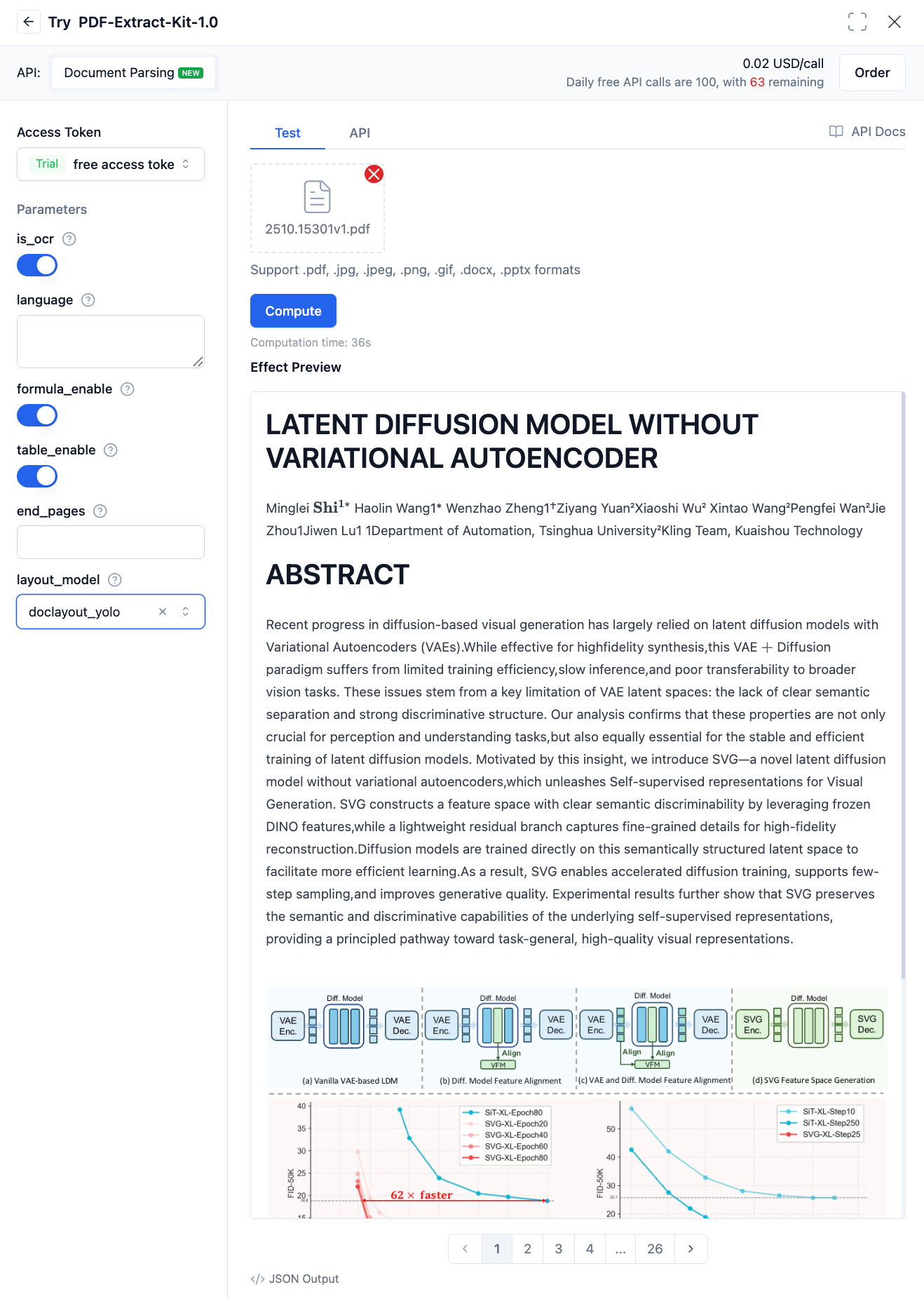
This interface is asynchronous. You need to submit the task first, obtain the task ID, and then poll for the execution result based on the ID. After submitting the task via CURL, the response will be:
{
  "task_id": "AAC2KETEYJVKER04U6RNMHJTOGLVEG1B",
  "status": "waiting",
  "created_at": 1742885184998,
  "urls": {
    "get": "https://api.moark.ai/api/v1/task/AAC2KETEYJVKER04U6RNMHJTOGLVEG1B",
    "cancel": "https://api.moark.ai/api/v1/task/AAC2KETEYJVKER04U6RNMHJTOGLVEG1B/cancel"
  }
}
Then obtain the final execution result using the task_id:
curl https://api.moark.ai/v1/task/AAC2KETEYJVKER04U6RNMHJTOGLVEG1B/
  --header 'Authorization: Bearer Your access token'
{
  "task_id": "AAC2KETEYJVKER04U6RNMHJTOGLVEG1B",
  "output": {
    "segments": [
      {
        "index": 1,
        "content": "# First paragraph xxxx"
      },
      {
        "index": 2,
        "content": "# Second paragraph xxxx"
      }
    ]
  },
  "status": "success",
  "created_at": 1742885185000,
  "started_at": 1742885188000,
  "completed_at": 1742885190000,
  "urls": {
    "get": "https://api.moark.ai/api/v1/task/AAC2KETEYJVKER04U6RNMHJTOGLVEG1B",
    "cancel": "https://api.moark.ai/api/v1/task/AAC2KETEYJVKER04U6RNMHJTOGLVEG1B/cancel"
  }
}
When the status in the response changes to success, the parsing is successful. output is the parsing result, and segments are the segmented parsing results, divided based on page or semantic logic.
 京公网安备11011502039387号