

Text Translation Interface
Overview
Different from traditional translation APIs, MoArk's Text Translation Interface is built on large language models. While it may be slightly higher in speed and cost compared to conventional translation interfaces, it provides more accurate and natural translation results by understanding contextual meanings.
This interface is compatible with the Google Translate API calling method, facilitating quick integration for users.
Key Features
- Accurate Translation: Leverages deep semantic understanding of large language models to deliver professional translations that better fit the context.
- Multi-language Translation: Supports translation between multiple common languages.
- Model Adaptation: Supports the use of specialized models optimized for translation tasks.
Usage Method
POST https://api.moark.ai/v1/translations
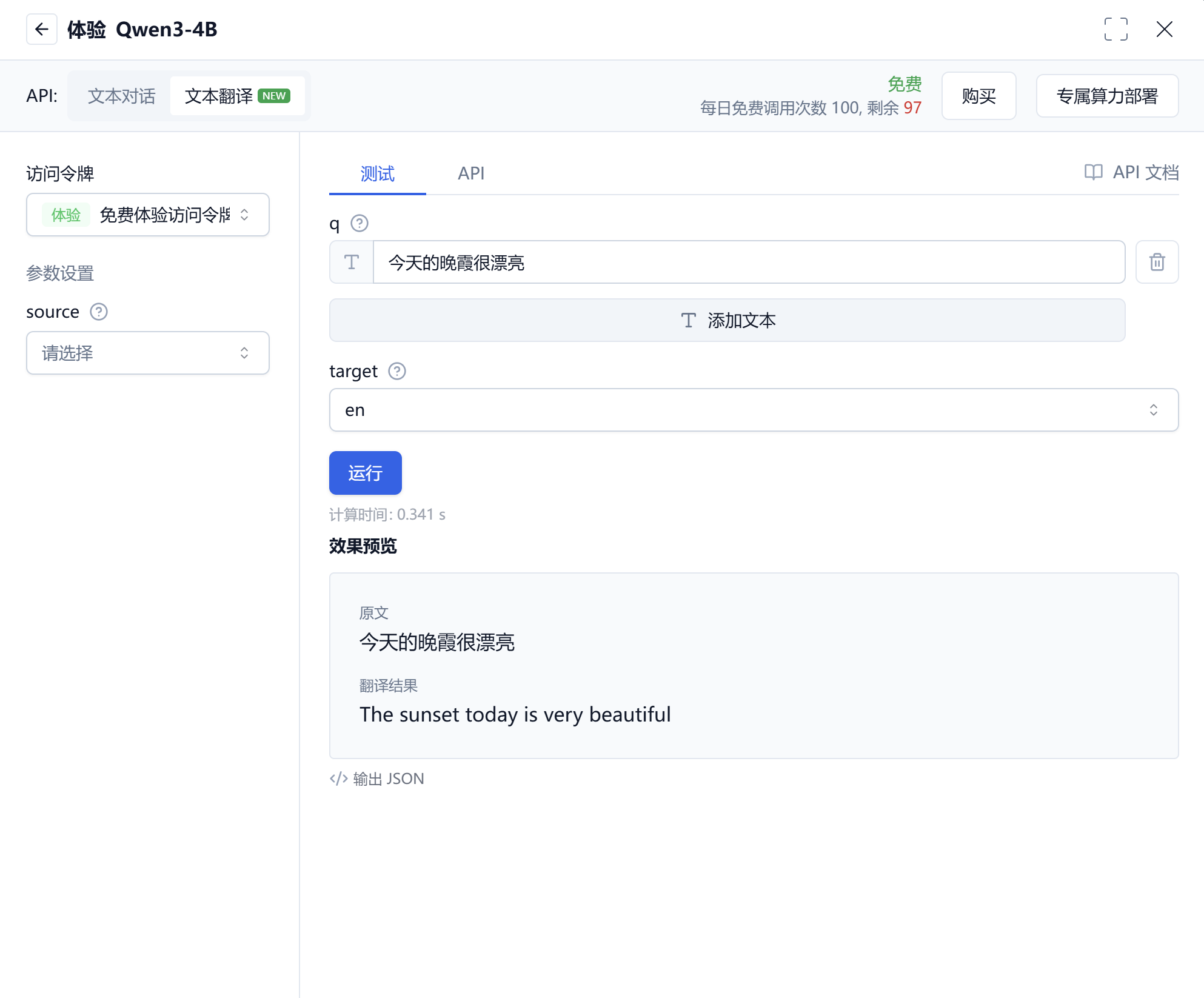
Input the text to be translated and the target language in the model usage interface to obtain translation results in real-time. The following is an example using the Qwen3-4B model:
Authentication Method
Please refer to MoArk API Authentication Method 。
Request Parameters
| Parameter | Type | Required | Description |
|---|---|---|---|
| q | string/array | Yes | Array of strings to be translated |
| model | string | No | Model name to use, currently only Qwen3-4B is supported |
| source | string | No | Source text that needs translation |
| target | string | Yes | Target language |
Supported Models List
| Model Name | Description |
|---|---|
| Qwen3-4B | A high-quality general-purpose large language model with strong language understanding and generation capabilities, suitable for text translation tasks. |
Response Content
If the request is successful, the response content example is as follows:
{
  "translations": [
    {
      "detected_source_language": "zh",
      "translated_text": "Hello, world!"
    }
  ]
}
Example Code
import requests
import json

API_URL = "https://api.moark.ai/v1/translate"
API_TOKEN = "XXXXXXXXXXXXXXXXXXXXXXXXXXXXXXXXXXXXXXXX"  # Please replace with your token
headers = {
    "Authorization": f"Bearer {API_TOKEN}",
    "Content-Type": "application/json"
}

def translate_text(text, target_lang, source_lang=None, model="Qwen3-4B"):
    payload = {
        "model": model,
        "q": text,
        "target": target_lang
    }
    if source_lang:
        payload["source"] = source_lang

    try:
        response = requests.post(API_URL, headers=headers, json=payload, timeout=30)
        response.raise_for_status()
        result = response.json()
        return result
    except requests.exceptions.RequestException as e:
        print(f"Request failed: {e}")
        return None
    except json.JSONDecodeError as e:
        print(f"Failed to parse response: {e}")
        return None

if __name__ == "__main__":
    # Example: Translate single text
    translation_result = translate_text("The weather is very nice today, perfect for a walk.", "zh", "en")

    if translation_result and "translations" in translation_result:
        for trans in translation_result["translations"]:
            print(f"Detected source language: {trans['detected_source_language']}")
            print(f"Translation result: {trans['translated_text']}")
    else:
        print("Translation request was not successful.")
Key Parameter Description:
-H "Authorization: Bearer ...":Used for authentication. Please replace Your_Access_Token with the actual token obtained from the MoArk console."q":Text to be translated. You can directly pass a single string (e.g., "The weather is very nice today") or an array of strings (e.g., ["Text one", "Text two"])."source"&"target":Specify the source and target language codes respectively.
For more example code, you can refer to MoArk Example Code Repository 。
Pricing Method
The Text Translation Interface offers two pricing models, with specific costs consistent with the pricing of the large language model used:
- Per Token Billing
- Per Request Billing
 京公网安备11011502039387号